EchoX Download APK
EchoX

One good question a day.
Answer it out loud.

Everyone gets the same one. Answer it out loud in Hindi or English, read how everyone else answered, and then the feed ends.

Today’s question · everyone on EchoX was asked this

Hindi and English, fully. More languages in beta.

Hold, say one sentence, let go.

answer it out loud — or try “open my notes”

Download for Android

Private beta · Android now, iPhone soon · free

Help us test EchoX for 14 days.

How a day on EchoX works

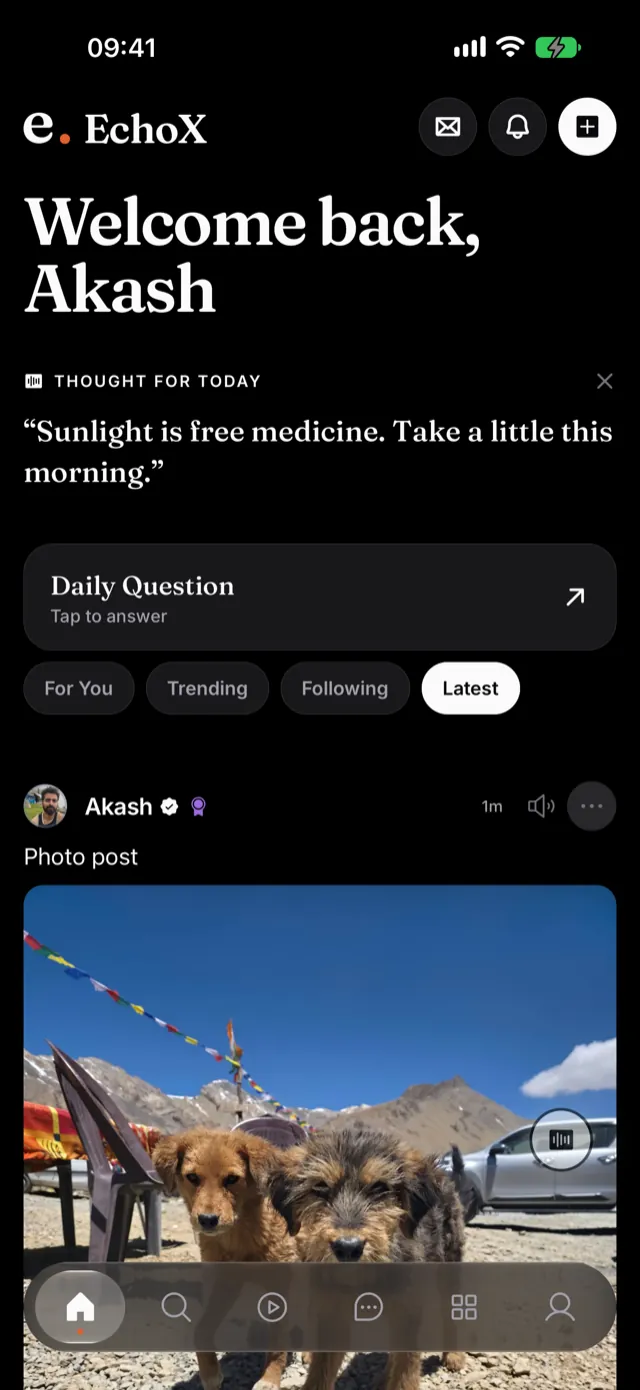
  1. EchoX home on an iPhone, with today's Daily Question at the top

    One question in the morning

    It waits at the top of your home screen. Everyone on EchoX gets the same one.

  2. Today's question and the answer box, on an iPhone

    Answer it out loud

    Tap the mic and talk, in Hindi, English or both. Your words appear as you say them. Typing works too.

  3. You’re all caught up

    That is everything for now. There is nothing hiding below.

    The end of the feed, word for word as the app shows it.

    Read everyone else’s, then stop

    Answering opens how everyone else answered. Then the feed ends, and you put the phone down.

10:11••••

EchoX

Welcome back, Akash

THOUGHT FOR TODAY

The quietest thoughts are usually the honest ones.

Today's question↗
For YouTrending FollowingLatest
HomeExplore ChatToolsYou

Hindi, English or both. The whole app, not just the posts.

You changed this page at the top. That was the easy half — a website is words. Here is the app doing it.

Greeting, tabs, buttons, the question itself. Switch it and everything moves. Not an English app that translates. An app that speaks your language. More languages are in beta.

EnglishLeft to right
हिन्दीLeft to right · Devanagari

Every screen, explained.

Real screens from the current build, on an iPhone and an Android phone, signed in to the founder’s own account. The numbers on each screen match the notes beside it.

The EchoX home screen on an iPhone
iPhone

Home

Where the day starts. Today’s question sits above the feed, not inside it.

  1. Thought for today. One line to start on. Close it with the × if you would rather not.
  2. Daily Question. Today’s question. Tap it to answer.
  3. Four feeds. For You, Trending, Following and Latest. You choose what you are reading.
  4. The floating button. Tap it for your tools. Hold it to talk to EchoX.
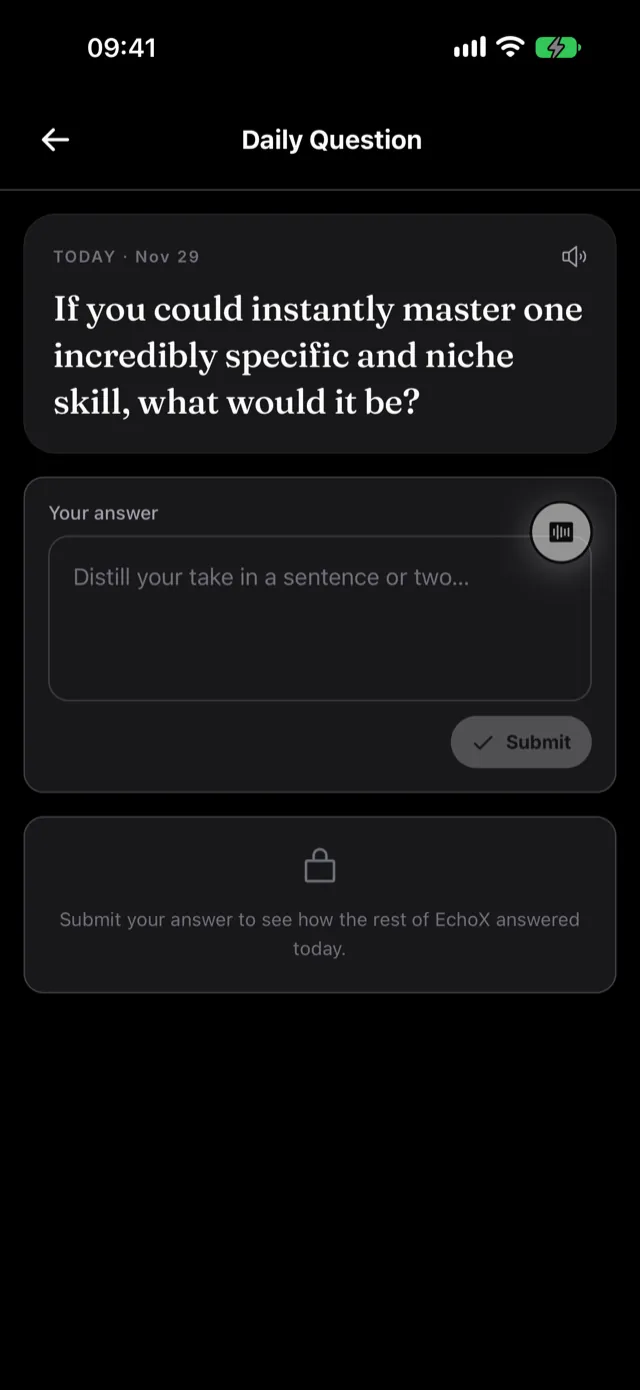
Today's question and the answer box, on an iPhone
iPhone

Today’s question

Everyone on EchoX gets the same question, every day.

  1. The question. Dated, and the same for everyone. The speaker reads it out.
  2. Your answer. A sentence or two, up to 600 characters, then Submit.
  3. Locked until you answer. Everyone else’s answers open only after you post yours, so nobody just agrees with the room.
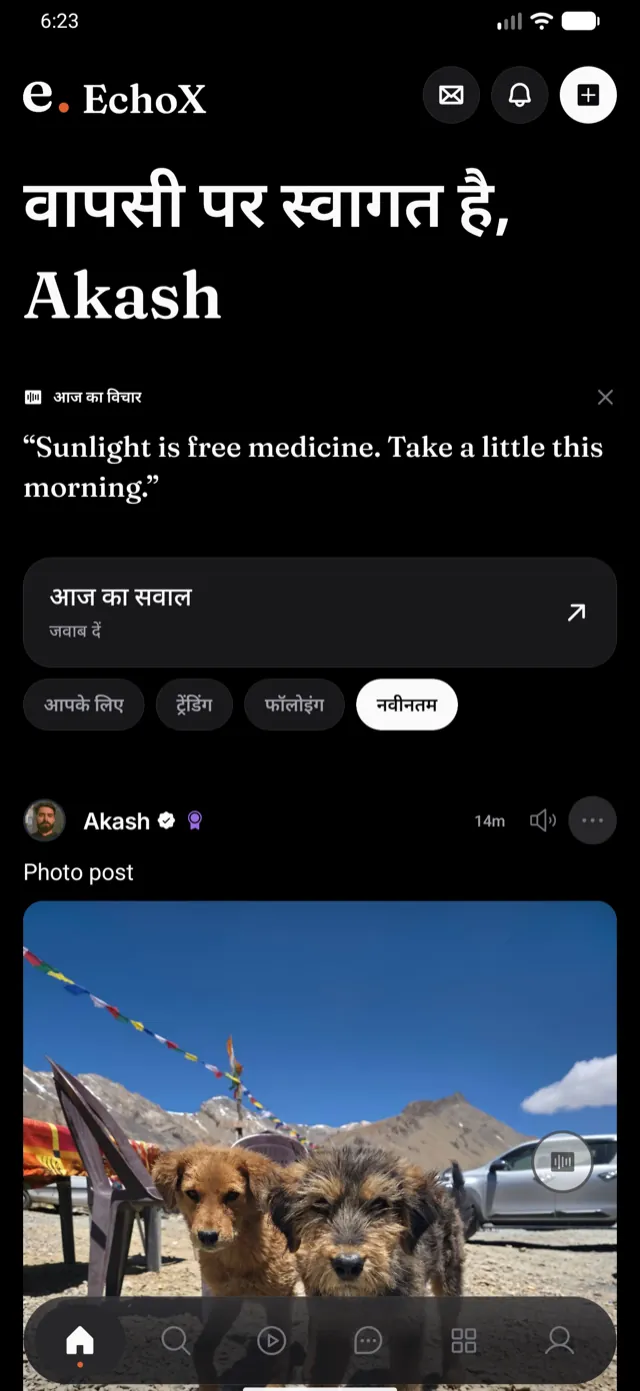
The EchoX home screen in Hindi on an Android phone
Android, in Hindi

The whole app in Hindi

Settings › App Language switches the app itself, not just a few labels.

  1. Headings and greetings change language. Your name stays as you wrote it.
  2. What people write stays as they wrote it. This line was written in English, so it reads in English.
  3. Buttons and cards change too: Daily Question becomes आज का सवाल.
  4. Feed names change too.
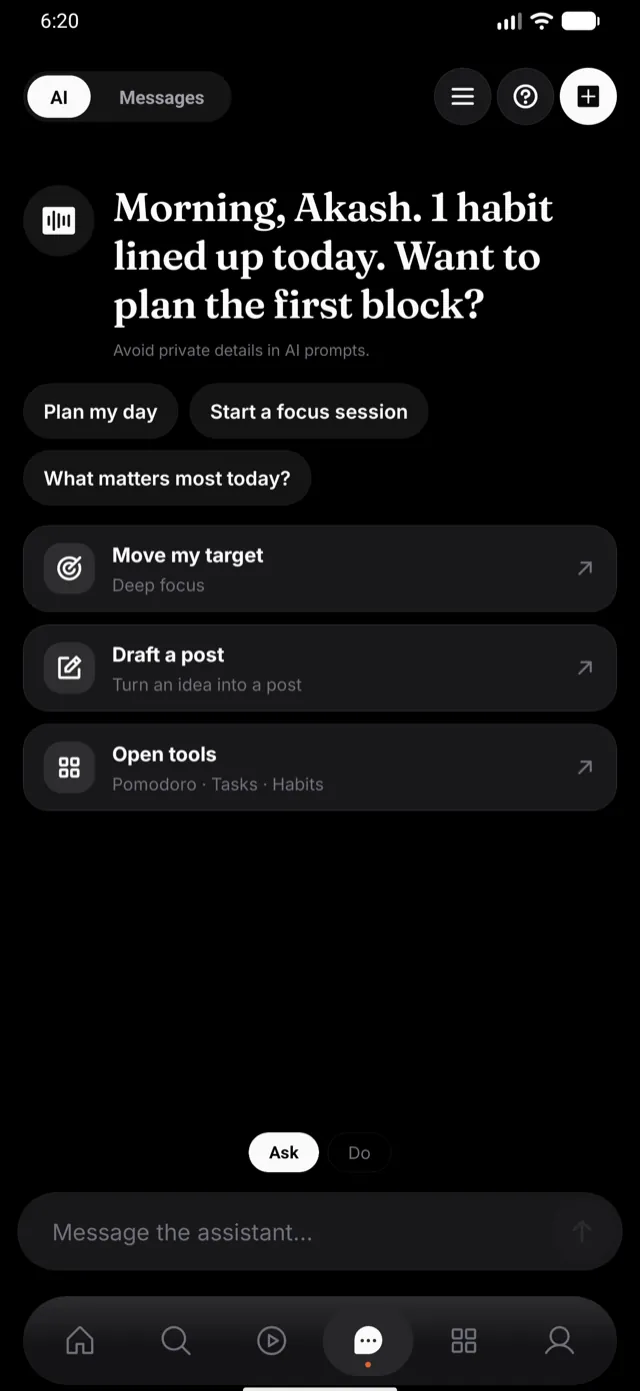
The EchoX assistant on an Android phone
Android

The assistant

It starts from your day, not from a blank box.

  1. It knows where you are. Here: one habit lined up, and an offer to plan the first block.
  2. Starters. One tap to plan the day or start a focus session.
  3. Shortcuts into your target, a draft post or your tools.
  4. Ask or Do. Ask only talks. Do can act for you, and still stops for your OK before it posts or changes anything.
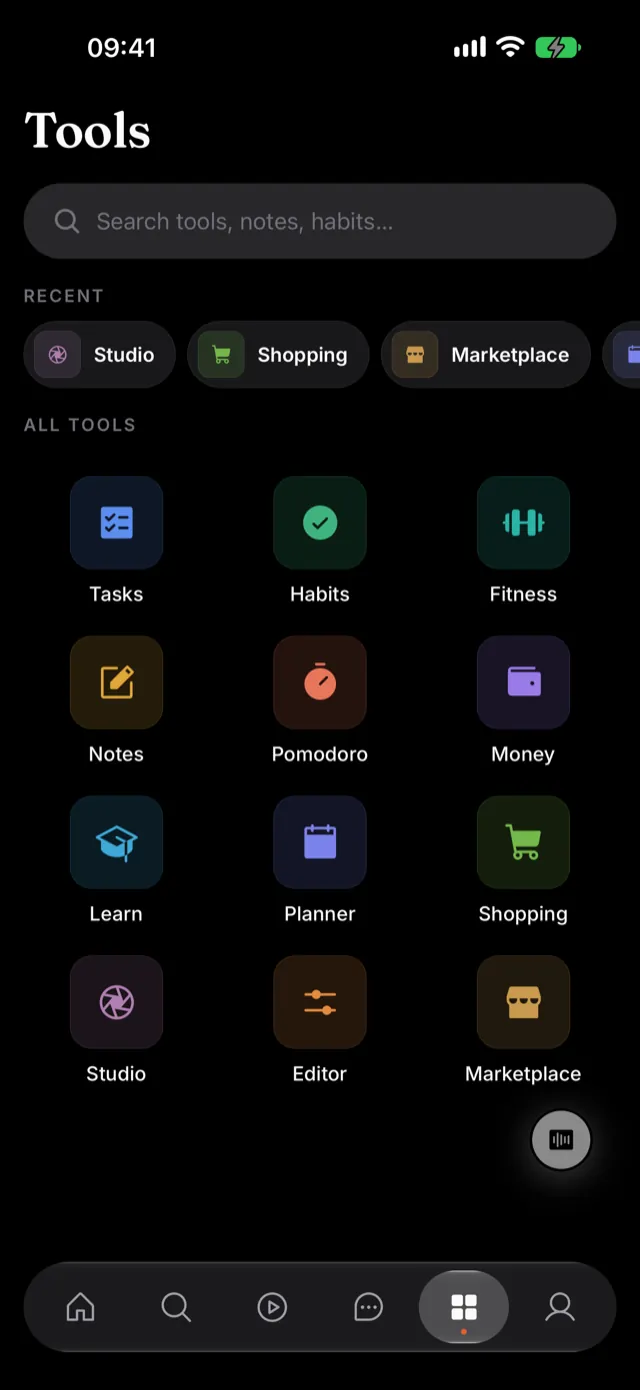
EchoX Tools on an iPhone
iPhone

Tools

Reasons to open the app on a day you have nothing to say.

  1. Search across tools, notes and habits.
  2. Recent. The tools you opened last, one tap away.
  3. Twelve tools. Tasks, habits, fitness, notes, a focus timer, money and more.
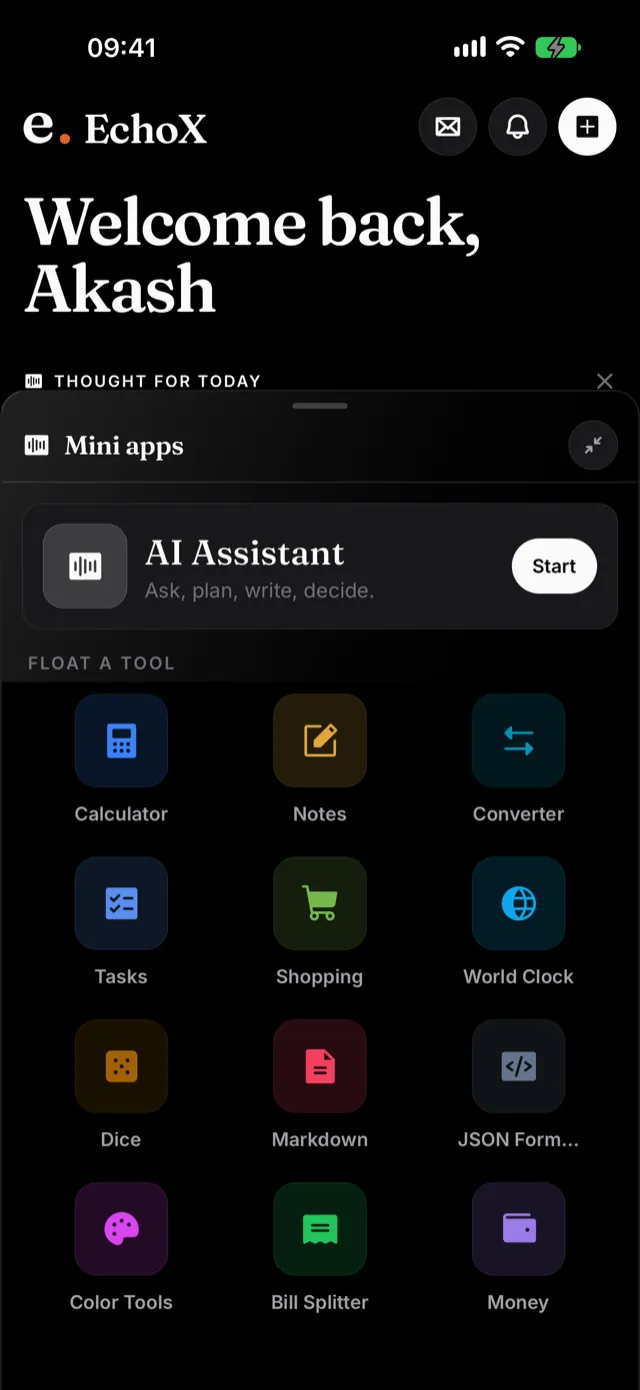
The floating tools panel open over the EchoX home screen on an iPhone
iPhone

Tools on top of anything

Tap the floating button and a panel opens over the screen you are on.

  1. Opens over the screen you are on. Here, over Home. Close it and you are back where you were.
  2. The assistant is one tap away.
  3. Float a tool: a calculator, notes, a converter, bill split and more.
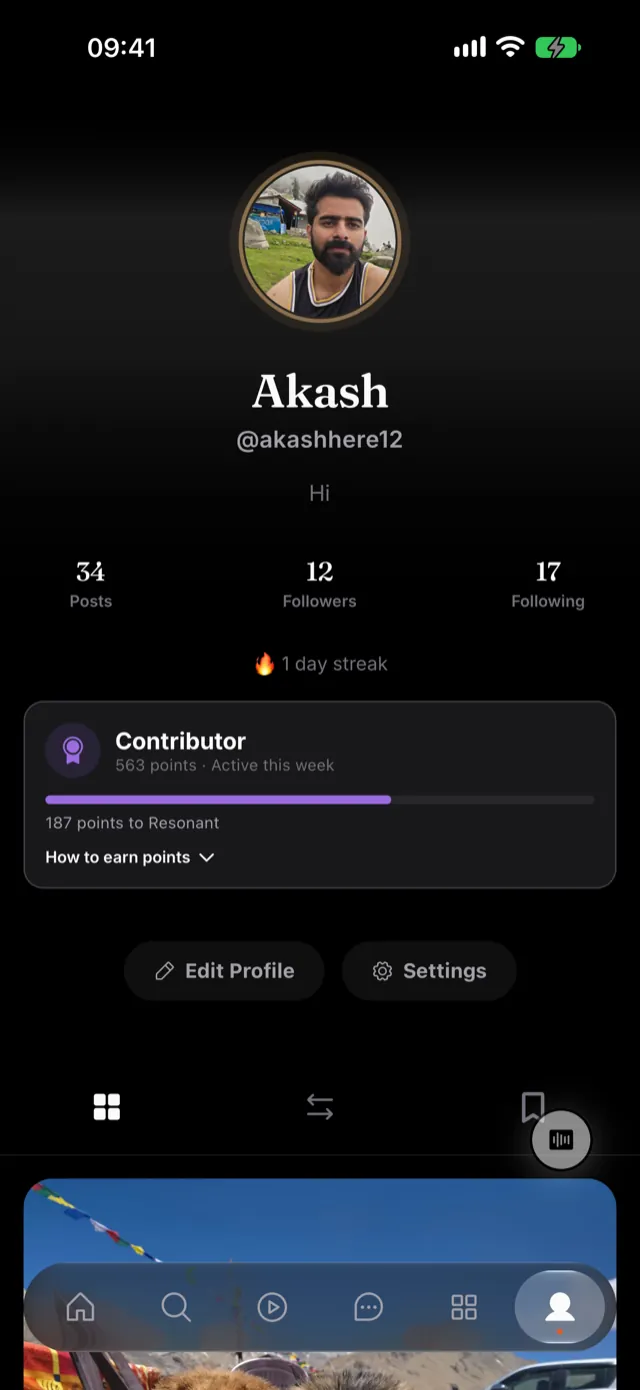
A profile on EchoX, on an iPhone
iPhone

Your profile

Your posts, your numbers and your level, on one page.

  1. Posts, followers and following.
  2. Points and a level for taking part, with how to earn them one tap away.
  3. Edit Profile and Settings sit right on the page.
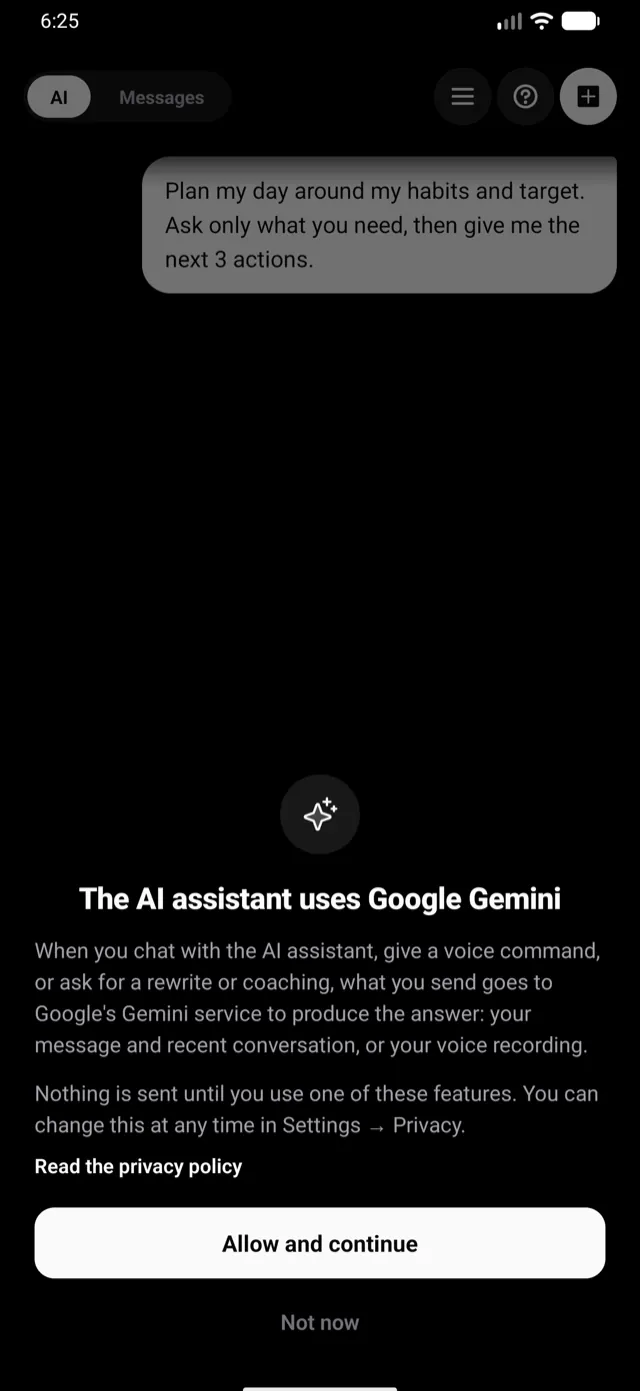
The sheet EchoX shows before any AI feature runs, on an Android phone
Android

Before anything goes to AI

The first time you use voice or the assistant, EchoX says where it goes.

  1. Named plainly. Voice commands and the assistant use Google’s Gemini service.
  2. Nothing is sent until you use one of these features. Change it any time in Settings › Privacy.
  3. Not now leaves the AI features off. Everything else works the same.

Settings › Privacy

On your terms.

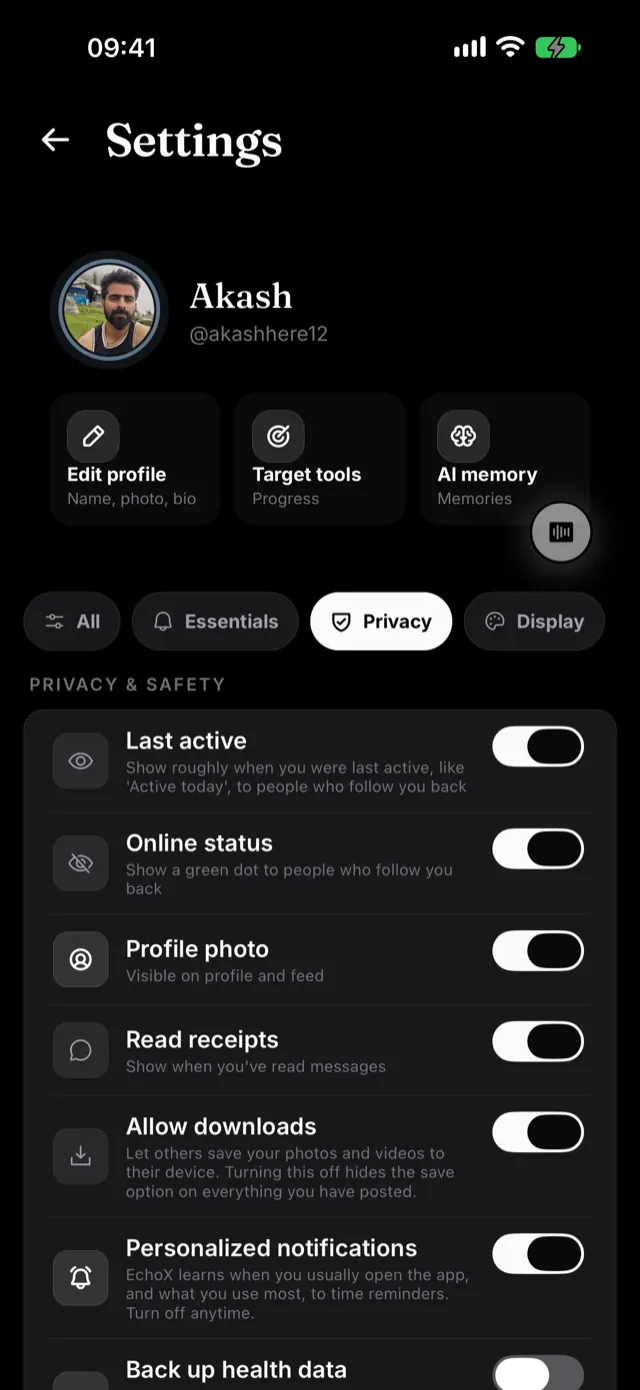
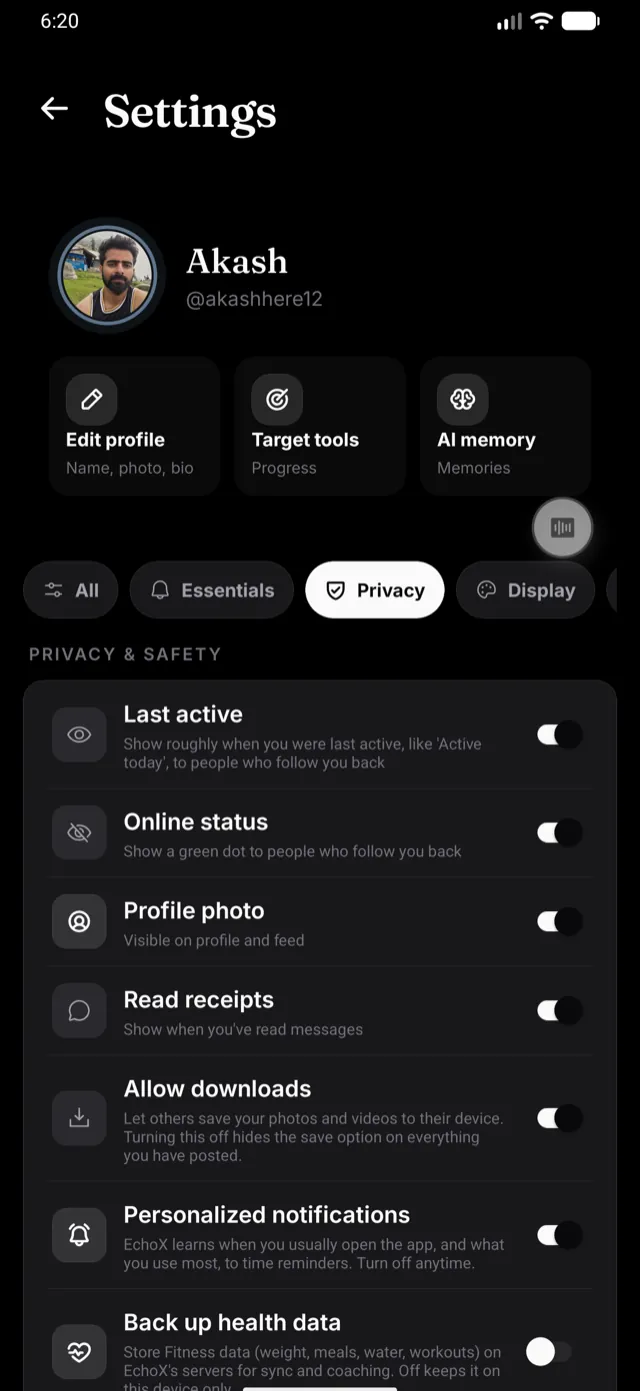
Everything that tells other people something about you has a switch, and the switches live on one screen. This is that screen, on both phones.

EchoX privacy settings on an iPhone
iPhone
EchoX privacy settings on an Android phone
Android
  • Last active and the online dot are shown only to people you follow back, and both turn off.
  • Read receipts and saving your photos each turn off with one switch.
  • Your fitness log stays on your phone unless you choose to back it up.
  • Reminder timing learns your routine only while you let it.
  • One-to-one text messages are end-to-end encrypted when you both use a current version. Photos, voice notes and group chats are not, yet.

Before you install

Fair questions.

Do I have to talk to it?

No. Every answer, post and message can be typed. Voice is there for the moments it is quicker: tap the mic in the answer box, or hold the floating button to tell EchoX what to do. It only listens until you stop. Speaking an answer uses your phone’s own speech recognition, the same as your keyboard’s mic.

Is it free?

Yes. Downloading EchoX and using it is free.

Who sees my answer?

It joins everyone else’s answers to that day’s question. People you have blocked do not see it, and you can delete it.

Is it a safe place?

EchoX is for people 18 and over. Comments, bios and usernames are checked against a blocklist before they go up, and anything or anyone can be reported or blocked.

Are my messages private?

One-to-one text messages are end-to-end encrypted when you both use a current version. Photos, voice notes and group chats are not encrypted that way yet. We say so rather than let you assume.

What does it need from my phone?

The microphone, the first time you use voice. Notifications only if you say yes when it asks. Nothing while it installs.

And if I want to leave?

Delete your account inside the app and what you wrote goes with it. Then uninstall it like anything else.

I am on an iPhone.

It is coming. Leave your email just below and we will write once, when it is ready.

EchoX

A calm, voice-first social app. One good question a day, in Hindi and English.

Akash Thakur · Sole proprietor
Shankar Nagar, Hoshiarpur
Punjab 146001, India

Grievance Officer

Akash Thakur

grievance@downloadecho.com

Published under the Information Technology (Intermediary Guidelines and Digital Media Ethics Code) Rules, 2021. Complaints are acknowledged within 24 hours and resolved within 15 days.

© 2026 Akash Thakur · EchoX is an independent product

18+